There’s a slow leak in most business databases, and it rarely announces itself. A customer moves to a new address, an email domain gets abandoned, a product line is discontinued but the SKUs stay active in the system. None of it triggers an alert, it just accumulates, quietly, until the day your sales team calls the wrong person three times in a row, or your revenue report doesn’t match what finance is seeing, or your AI model starts producing recommendations that make no sense.
That’s usually when the conversation about database cleansing begins. By then, though, the damage has already been compounding for months.
What is Database Cleansing?
Database cleansing, also referred to as data cleansing or data scrubbing, is the process of identifying and correcting inaccurate, incomplete, duplicate, or outdated records within a database. The goal isn’t simply to delete bad data; it’s to bring the entire dataset to a state where it can actually be trusted for analysis, operations, and decision-making.
This is worth distinguishing from database backup or migration. A perfect backup of corrupted data is still corrupted data. Cleansing addresses what’s inside the records, not just where those records are stored or how they’re protected.
In practice, a database cleansing effort typically involves detecting and merging duplicate records, standardizing formats across fields (dates, phone numbers, addresses, currency), handling missing or null values through imputation or removal, validating records against defined business rules, refreshing or retiring outdated entries, and removing orphaned data that no longer serves any active purpose.
Why data gets dirty in the first place

Data doesn’t degrade randomly. There are predictable patterns behind it, and understanding them tells you exactly where to focus your cleansing efforts.
Manual entry without enforcement is the most common culprit. When people type information by hand without validation rules in place, the same customer ends up as “John Smith,” “john smith,” and “J. Smith” depending on who entered the record and when. To a human, these are obviously the same person. To a database, they’re three separate entities that will never be joined unless someone explicitly reconciles them.
System integrations introduce a different kind of mess. Every time a new CRM, ecommerce platform, ERP, or marketing tool connects to your central database, it arrives with its own data conventions. Field names differ, date formats clash, and what one system calls “phone_number” another labels “contact_tel.” Even when the original data in each individual system was clean, the merge process introduces inconsistency that accumulates across every new integration.
Natural data decay is the quietest problem of all. People change jobs, move homes, and stop using old email addresses. According to research published by Experian, contact data decays at a rate of roughly 25 to 30 percent per year. A database that hasn’t been actively maintained for two years has potentially lost a third of its accuracy without a single record being deliberately deleted.
Technical errors during data transfer round out the picture. Encoding mismatches, string truncation during import, and data loss during ETL pipeline failures all leave invisible residue, not the kind of errors that throw exceptions and alert someone, but subtle corruptions that quietly skew results over time.
The real cost of unclean data
Most organizations have an intuition that their data isn’t perfect. Fewer have actually calculated what that imperfection is costing them, largely because the costs are distributed across departments and easy to attribute to other causes.
Messy data leads to misdirected business
The most damaging consequence of unclean data isn’t a system crash or an obvious error, it’s the quiet accumulation of wrong decisions made confidently, based on numbers that looked reliable but weren’t. A marketing team that optimizes campaigns around a customer segment that doesn’t actually exist in the way the data suggests. A finance team that reports revenue growth that’s partly an artifact of duplicate transaction records. An operations team that sizes infrastructure based on query patterns distorted by years of redundant data. None of these errors announce themselves. They compound in the background until the gap between what the data shows and what’s actually happening becomes impossible to ignore.
Marketing spend going to the wrong places
When a contact database contains invalid emails, outdated addresses, and duplicated records, every campaign is working against itself. Bounce rates climb, deliverability scores drop, and retargeting budgets get allocated to people who no longer exist at those email addresses. Platforms like HubSpot or Marketo are sophisticated tools, but their output quality is entirely dependent on the data you put in. Garbage in, garbage out isn’t just a cliché, it shows up as a line item in your campaign budget.
A real example of what this looks like in practice: a B2B company documented in The Data Business’s research was running outbound campaigns against a database that included companies that had downsized or shut down entirely, resulting in a 20% drop in campaign ROI. After a full data cleansing and enrichment process, email deliverability improved by 35% and closed deals increased by 15% within six months without any changes to the campaign strategy itself.
Analytics that mislead instead of inform
A beautifully designed dashboard built on dirty data produces confident-looking numbers that are simply wrong. Duplicate transactions inflate revenue figures. Miscategorized customers distort segment performance. When finance and marketing pull reports from the same underlying system and arrive at different numbers, the problem usually isn’t the reporting tool, it’s the data those tools are reading from.
NetSuite’s analysis of common data mistakes describes a pattern that plays out across industries: a customer who makes both in-store and online purchases gets counted as multiple separate customers when their records aren’t unified across systems, producing incorrect customer counts, distorted purchasing patterns, and duplicate payment records. At scale, these fragmentation errors don’t just affect one metric, they flow through every cohort analysis, LTV calculation, and retention report built on top of the underlying data.
Operational drag that compounds over time
Systems processing redundant or malformed data run slower than they need to. Queries take longer, storage gets bloated, and ETL pipelines carry weight they shouldn’t have to. The effect feels minor at first, but it compounds as data volume grows. Clean data isn’t just more accurate, it’s meaningfully more efficient to work with at scale.
Tradeshift, a B2B payments platform, found that their sales team was spending significant time each week manually researching leads because incoming records from web forms and list imports contained only a name and email, not enough information to segment, score, or route effectively. After deploying automated deduplication and enrichment through ZoomInfo Operations, the team saw a 23% increase in active selling time, and the overall use of resources became 10 times more cost-effective compared to their previous approach of cleansing data after the fact rather than at the point of entry.
Compliance exposure
Under GDPR and similar data protection regulations, holding personal data beyond its useful purpose, or storing inaccurate information about individuals without correction mechanisms, creates real regulatory risk. For organizations handling personal data at any meaningful scale, database cleansing isn’t optional hygiene, it’s part of legal due diligence.
The exposure is more specific than many teams realize. GDPR Article 5 explicitly requires that personal data be “accurate and, where necessary, kept up to date,” placing an affirmative obligation on organizations to correct or erase inaccurate records. Tradeshift’s case also illustrates the compliance dimension directly: with duplicate records across their database, managing opt-outs and unsubscribes became unreliable, there was no guarantee that a suppression applied to one record had been applied to all instances of that contact. As their data operations manager noted after the cleansing process, deduplicated data gave them “the surety that when we record opt-outs or unsubscribes they are fully registered to that specific person, there are no other records out there.”
According to IBM’s research on data quality, poor data quality costs US businesses approximately $3.1 trillion annually. That figure covers wrong decisions, wasted operational effort, and missed opportunities, all of which trace back, in some way, to data that couldn’t be trusted.
A practical database cleansing process
There’s no universal playbook, but there is a logical sequence that holds up across most organizational contexts.
Step 1: Audit before you act
Before touching anything, measure what you’re actually dealing with. Run profiling queries to understand the completeness of each field, the distribution of values in key columns, and the extent of duplication across the identifiers that matter most: email, phone number, customer ID, and so on. This step gets skipped more often than it should, usually because teams assume they already understand their data. In practice, they almost never know it as well as they think, and the audit surfaces surprises that change the entire approach.
Step 2: Define cleaning rules with the business and align them across departments
What makes a phone number valid in your system? When is an email address considered undeliverable? What criteria define two records as duplicates, exact name match, or fuzzy matching within a certain edit distance? These rules can’t be decided by engineers working in isolation. They require genuine input from the people who use the data day-to-day: sales, marketing, finance, customer service. Without that input, you’ll clean data in ways that make technical sense but create unexpected operational problems downstream.
Step 3: Run a pilot on a representative subset
Apply your cleaning rules to roughly 5 to 10 percent of the dataset before touching the rest. Review the results with relevant stakeholders and look closely for cases where the rules produced outcomes that technically passed validation but made no practical sense. Catching a flawed rule at this stage costs almost nothing. Catching it after the full dataset has been processed is a significantly more painful conversation.
Step 4: Execute the full run and validate the results
Run the complete cleansing process, then re-run the audit queries from Step 1 and compare the before-and-after metrics side by side. Concrete improvement numbers matter here, they justify the investment to leadership, and they establish a meaningful baseline for tracking data quality over time.
Step 5: Build prevention into the pipeline
This is the step most projects deprioritize, and it’s precisely why the same problems tend to resurface within six months. Input validation at the point of entry, automated standardization during data ingestion, and scheduled quality checks all need to be embedded into ongoing processes rather than bolted on after the fact. Cleansing without prevention is, at best, a temporary fix.
Comparing database cleansing approaches
| Approach | Strengths | Limitations | Best Suited For |
| Manual review | High precision, context-sensitive judgment | Doesn’t scale, time-intensive | Small datasets, sensitive records requiring human judgment |
| SQL/Python scripts | Repeatable, auditable, fast to execute | Requires technical skill, rules must be explicitly defined | Teams with data engineering capacity, medium to large datasets |
| ETL tools (Talend, Informatica) | Visual workflow, broad feature set, enterprise connectors | High licensing cost, steep learning curve | Enterprise-scale pipelines with complex transformation needs |
| Outsourced data services | No internal capability required upfront | Vendor dependency, potential data security exposure | Organizations without in-house data teams |
| AI-assisted cleansing | Detects complex pattern-based errors, learns over time | Limited explainability, requires large training data | High-volume environments with strong technical teams |
Most mature data organizations end up combining approaches: automated scripts for anything that can be standardized through clear rules, and human review for decisions that genuinely require business judgment. Neither extreme, fully manual or fully automated, works well on its own.
Database cleansing for customer data
Customer and CRM data is where dirty databases cause the most immediate, measurable business harm and equally, where a well-executed cleansing effort delivers the clearest returns.
Customer records degrade in predictable ways. The same individual exists across multiple systems with slightly different names and contact details. Email addresses were valid at signup but have since been abandoned. Customers who churned years ago are still marked as active because no one built a process to update their status. Each of these issues is manageable in isolation; together, they systematically distort the picture of who your customers actually are and how they’re behaving.
A concrete example: a B2B SaaS company audits its CRM and finds 44,000 contact records. After deduplication and validation, the actual unique individuals number around 29,000. Every email campaign they’d been running was reaching a meaningful portion of recipients more than once, damaging sender reputation and inflating engagement metrics with false positives. The conversion rates they’d been reporting were off by several percentage points, which meant the targeting decisions built on top of those rates were also off.
For organizations managing customer data at scale, database cleansing typically sits alongside a broader Master Data Management (MDM) strategy, establishing a single authoritative source of truth for each customer entity that other systems reference rather than duplicate. If you’re working through that kind of infrastructure challenge, Varmeta’s data consulting and implementation services help organizations across industries design data foundations that hold up as they grow.
Common mistakes that undermine cleansing projects
Treating it as a one-time project is probably the most widespread mistake. Data creation has no finish line, which means data quality management doesn’t either. Organizations that run one large cleansing effort and then consider the problem solved will typically be back to a degraded state within a year, often sooner.
Deleting when you should archive is a subtler error. Not every outdated record should be removed. Historical transaction data, past behavioral signals, and system logs often carry long-term analytical value that isn’t obvious in the moment. The goal of cleansing is to make data trustworthy and usable, not to minimize the amount of it.
Absence of clear data ownership turns cleansing into a permanent ambiguity. When data quality is theoretically everyone’s responsibility, in practice it belongs to no one. Data domains need assigned owners who are accountable for the quality of records within their area not just technical owners, but business stakeholders who understand what accuracy means for their specific use cases.
Cleansing without business context produces technically clean data that still creates operational problems. A blank address field might represent a data entry error, or it might reflect a deliberate customer choice. A record flagged as a duplicate might actually represent two different individuals with similar names. These judgment calls require people who understand what the data is for, not just what it looks like in a query result.
Tools commonly used for Database Cleansing
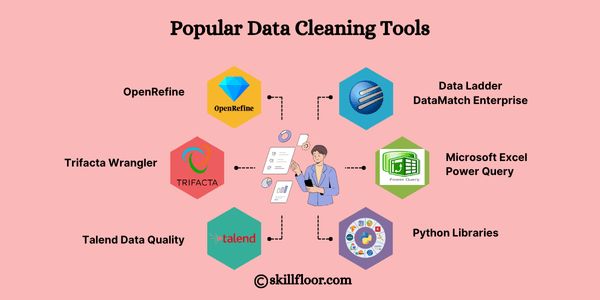
Choosing the right tool comes down to your team’s technical profile, the scale of your data, and where in the stack you want quality controls to live. Here’s a quick reference before diving into each option:
| Tool | Type | Technical Skill Required | Best For | Cost |
| OpenRefine | Desktop application | Low to medium | Exploratory cleaning, text clustering | Free (open-source) |
| Python (pandas / pyjanitor) | Programming library | Medium to high | Custom pipelines, automation | Free (open-source) |
| dbt | SQL-based framework | Medium | Warehouse-layer transformation and standardization | Free tier + paid cloud |
| Great Expectations | Python framework | Medium to high | Ongoing data quality monitoring and validation | Free (open-source) |
| Talend / Informatica | Enterprise ETL platform | Medium (visual UI) | Complex enterprise pipelines at scale | Paid (enterprise licensing) |
| Trifacta / Alteryx | Visual data prep tool | Low to medium | Business users doing ad-hoc cleaning without writing code | Paid |
OpenRefine
OpenRefine, formerly Google Refine, is the natural starting point for teams that need to explore and clean messy datasets without writing code. Load a file, and the interface immediately surfaces value distributions, blank counts, and inconsistencies in a way that makes problems visible without needing to write a single query.
Where it genuinely stands out is text clustering. OpenRefine offers multiple algorithms, key collision fingerprinting, metaphone phonetic matching, nearest-neighbor with Levenshtein distance to group values that are likely the same entity entered in different ways. “New York,” “new york,” and “N.Y.” can all be collapsed into a single canonical value in a few clicks, and for anyone working with address data, company names, or product categories accumulated through years of human input, this capability alone saves a considerable amount of time.
The limitation is scale. OpenRefine loads data into memory, which means it struggles with files beyond a few hundred thousand rows, and it’s inherently manual rather than repeatable. Think of it as the right tool for understanding what you’re dealing with and handling the initial pass, after which the output feeds into more systematic automated processes.
Python with pandas and pyjanitor
For teams comfortable writing code, Python offers more flexibility than any other option in this list. The pandas library handles data loading, transformation, filtering, deduplication, and export across virtually every file format and database connector you’re likely to encounter. pyjanitor extends pandas with a cleaner method-chaining syntax specifically designed for cleaning workflows, making the code more readable and easier to maintain as the project grows.
The core advantage here is reproducibility. A cleaning script written in Python can be version-controlled in Git, peer-reviewed, unit-tested, and scheduled to run automatically on a cadence. When source data changes or new edge cases emerge, you update the script and re-run, with the entire history of changes remaining auditable. A typical workflow might load raw data from a PostgreSQL table, standardize phone numbers using a regex pattern, flag records where required fields are null, deduplicate based on email using fuzzy matching via the thefuzz library, and write the clean output back to a staging table all within a few minutes, triggered automatically via Airflow or a cron job.
The tradeoff is straightforward: if your team doesn’t have Python proficiency, this approach requires meaningful upfront investment before it starts delivering returns.
dbt (data build tool)
dbt has meaningfully changed how modern data teams think about transformation and quality. Rather than treating data cleaning as a separate upstream step that happens before data enters the warehouse, dbt lets you embed it directly inside the transformation layer, written in SQL, which most analysts already know.
In a dbt project, you define models as SQL SELECT statements that transform raw source data into clean, structured tables, and you attach tests directly to those models: assert that a column has no nulls, that values fall within an expected range, that a foreign key relationship holds. When a test fails, dbt surfaces it in the run output, catching quality issues before they propagate to dashboards or downstream models. The ecosystem has matured considerably, packages like dbt-utils and dbt-expectations add hundreds of pre-built test macros, and the result is a codebase where data quality is documented, tested, and version-controlled alongside the transformations themselves.
dbt works best for organizations already running a cloud data warehouse like Snowflake, BigQuery, or Redshift. If that’s your stack, embedding data quality into dbt is arguably the highest-leverage improvement available without adding new infrastructure.
Great Expectations
Great Expectations (GX) approaches data quality from a fundamentally different direction. Rather than transforming data, it validates it, you define a set of “expectations” describing what your data should look like, and GX checks whether reality matches those expectations at any given point in time, whether that’s a daily schedule, a CI/CD pipeline trigger, or an on-demand run before a critical report.
An expectation might specify that the email column should contain no null values, that entries in country_code should belong to a defined list of valid ISO codes, or that the row count of a particular table should stay within a certain range. These get bundled into Expectation Suites that run automatically against your data. The Data Docs feature, automatically generated HTML reports showing the current state of each expectation and its trend over time, gives non-technical stakeholders a readable view of data quality without requiring direct database access.
The setup cost is worth acknowledging honestly. GX has a steeper learning curve than its documentation implies, and configuring it properly for a production environment takes genuine effort. Once in place, however, it provides the kind of continuous quality monitoring that transforms database cleansing from a periodic project into an always-on discipline.
Talend / Informatica
These are enterprise-grade ETL platforms with data quality modules built directly into the product. Talend Open Studio offers a free tier, while Talend Data Fabric and Informatica Intelligent Data Management Cloud are paid products positioned at larger organizations with complex, multi-system environments.
Both provide visual, drag-and-drop interfaces for building data pipelines that include cleansing, standardization, deduplication, and enrichment steps, without requiring the team to write code. They ship with pre-built connectors for hundreds of data sources, built-in reference data for address standardization and name parsing, and governance features including data lineage tracking and metadata management.
The case for these platforms is strongest when you need to integrate data quality into a complex enterprise architecture with multiple source systems, strict governance requirements, and a team that spans technical and non-technical users. For smaller organizations or teams with strong coding capability, however, the additional functionality rarely justifies the licensing spend relative to open-source alternatives.
Trifacta / Alteryx Designer
Trifacta, now part of Alteryx, sits in the middle ground between OpenRefine and a full ETL platform. It targets data analysts and business users who need to clean and prepare data regularly but aren’t software engineers, using a visual recipe model where you apply transformation steps through a point-and-click interface and Trifacta generates the underlying code automatically.
Its standout feature is suggestion intelligence: as you interact with a dataset, the tool proactively surfaces relevant transformations based on patterns it detects. Inconsistent date formats get flagged with a normalization suggestion. Columns with common unwanted prefixes prompt a stripping option. For analytics teams in larger organizations where self-service data preparation matters and centralized engineering support is limited, this makes a real difference in day-to-day velocity. For teams with strong technical depth, the cost is harder to justify when capable open-source alternatives exist.
For organizations looking to formalize their overall approach to data quality, the frameworks and standards published by DAMA International, the professional association for data management practitioners, serve as a well-regarded reference point across the industry.
Signs your database needs cleansing now
You don’t need to wait for a visible crisis to justify taking action. Email campaign bounce rates that have been climbing steadily over recent months suggest contact data is decaying faster than it’s being maintained. Reports pulled by different teams from the same system consistently producing different numbers for the same metrics points to unresolved duplication or classification inconsistency. Basic queries that used to run quickly now taking noticeably longer indicate the database is carrying more dead weight than it should.
Customers reaching out because the information on file is wrong, or because they’re receiving duplicate communications, means the data problems are now customer-facing and affecting trust. And exception rates in data pipelines trending upward over time usually trace back to upstream data quality issues rather than infrastructure failures.
Beyond reacting to these signals, organizations with mature data practices schedule cleansing on a regular cadence, typically quarterly or biannually, combined with automated monitoring that surfaces degradation before it reaches downstream operations.
Schedule your database cleansing tasks
Database cleansing doesn’t exist in isolation. It’s one component of a broader data management ecosystem that includes data governance, data lineage tracking, and data observability and its value compounds significantly when those other elements are also in place.
Organizations that treat data as a strategic asset understand that investing in data quality isn’t an operational expense to be minimized; it’s the foundation that makes every AI initiative, analytics capability, and personalization strategy actually function as intended. A machine learning model trained on dirty data produces unreliable predictions regardless of how sophisticated the algorithm is. A real-time dashboard built on inconsistent records is a source of misinformation rather than intelligence.
Rather than waiting for visible problems to surface, the most effective approach is to schedule cleansing tasks on a regular cadence, quarterly at minimum, with automated monitoring running continuously in between. Treating database cleansing as a recurring operational commitment, rather than a one-off project, is what separates organizations that maintain reliable data over time from those that clean reactively and find themselves back in the same position.
FAQ
1. How often should database cleansing be performed?
For most organizations, a full cleansing cycle every quarter works well, with automated monitoring running continuously in between. If your business pulls in data from multiple sources or runs high-volume campaigns, add a monthly audit of key fields on top of that.
2. What’s the difference between database cleansing and data enrichment?
Cleansing fixes what’s already there: correcting errors, removing duplicates, standardizing formats. Enrichment adds what’s missing: job titles, firmographic data, third-party signals. The two often go together, but cleansing should always come first. There’s no point enriching a record that’s about to be merged or deleted.
3. Can database cleansing be fully automated?
Partially. Formatting, duplicate flagging, and null-value handling can all be automated reliably. But some decisions, whether two records represent the same person, or whether a blank field is intentional, require business judgment that automation can flag but can’t resolve on its own.
4. Will cleansing accidentally delete data I might need later?
A well-designed process archives rather than hard-deletes, especially for historical records that may hold analytical value. What gets removed outright is typically obvious junk: test entries, malformed rows, records that never held valid data to begin with.
5. How do I know if the cleansing effort actually worked?
Run the same profiling queries before and after and compare directly: completeness rates, duplicate counts, validation pass rates. On the operational side, watch for improvements in email deliverability, query performance, and report consistency across teams.
Looking to assess your current data infrastructure or build a cleansing and governance process that scales with your organization? Varmeta helps businesses move from reactive data firefighting to proactive, sustainable data quality management.