On November 1, 2026, Microsoft permanently removes the AI Builder credits that come bundled with Power Apps Premium, Power Automate Premium, and several Dynamics 365 licenses. Every organization still relying on those seeded credits has to move onto Copilot Credits by that date or watch AI-driven flows stop running. That deadline is less than three months away from this article’s publish date, and it’s a small preview of a bigger shift: AI capability inside Microsoft workflow tools is arriving faster than the licensing, governance, and audit infrastructure built to support it.
Power Automate and Copilot Studio are the two Microsoft workflow tools carrying most of that AI capability today, and Power Automate now connects to more than 1,000 services through standard, premium, and custom connectors. Microsoft’s 2026 release wave 1 added a Model Context Protocol server so external AI tools can plug into that connector layer directly.
That architecture is genuinely strong for moving data between systems. It was not built to answer a different question that AI steps now raise constantly: when Copilot drafts a response, when AI Builder extracts a value from a document, or when a Copilot Studio agent decides which system to update, can anyone prove afterward that the decision was correct, not just that the step executed.
How AI actually enters a Microsoft 365 workflow

A cloud flow built in Power Automate, one of the core Microsoft workflow tools most IT teams already run, works on trigger-action logic: a file lands in a SharePoint folder, an approval request fires, a record updates. Given the same trigger and the same data, it does the same thing every time, and the flow’s run history is proof enough that it worked. That’s still how most Power Automate flows operate today, and it’s the model the platform’s audit tooling was designed around.
AI changes what happens inside individual steps of that same flow. Copilot drafts text based on context it retrieves at runtime, which can vary between two runs even with similar inputs. AI Builder reads a document and extracts fields using a trained or prebuilt model, producing a confidence score rather than a guaranteed-correct value. A Copilot Studio agent goes further still: it interprets a request, decides which topic or action applies, and can call a Power Automate cloud flow as one of several possible next steps, choosing the path itself rather than following one a maker hardcoded in advance.
| Rule-Based Flow Step | AI-Driven Step | |
|---|---|---|
| Core behavior | Executes a predefined action when its trigger fires | Interprets context and selects its own output or next action |
| Same input, twice | Produces the same result every time | Can produce a different result depending on context at runtime |
| What the run history proves | That the exact defined action executed | That a step ran and produced an output, not that the output was correct |
| Example in Microsoft 365 | Move a file to a folder when it’s tagged “Approved” | An AI Builder model extracts an invoice total with an 82% confidence score |
| What’s needed to trust it | The run history itself is sufficient | Something beyond the run history has to confirm the output was right |
Where power automate’s architecture holds and where it breaks
The connector library is the platform’s real strength, and it’s the reason most Microsoft workflow tools evaluations start and end with Power Automate. For structured, in-boundary automation, approvals, notifications, file routing between systems Microsoft already integrates with, that architecture holds up well and has for years. The moment a workflow needs to reason through an exception, branch on ambiguous context, or reach a system outside Microsoft’s published connector list, the same trigger-action design becomes a ceiling rather than a foundation.
Microsoft’s own product team has started acknowledging a version of this gap publicly. In its June 2026 Power Platform update, Microsoft noted that governance can no longer stop at tracking which connectors a tenant uses. What matters now, in the company’s own words, is visibility into which actions and MCP servers inside those connectors AI tools actually call. That’s a meaningful shift in what the platform vendor itself considers necessary to govern, and it’s a tacit admission that connector-level visibility, which is what most admins have relied on for years, doesn’t tell you what an AI agent did once it had access.
The Copilot Studio licensing gap nobody can pin down
Licensing confusion like this is common across Microsoft workflow tools generally, and Microsoft’s own licensing documentation states plainly that Power Automate use rights inside Copilot Studio are limited to cloud flows running in the context of a Copilot Studio bot. That’s a narrower grant than a general Power Automate license, and teams building anything beyond a single bot’s scope often need separate Power Automate licensing on top of what Copilot Studio includes.
In practice, even IT teams already running both products struggle to pin down where that boundary sits. A thread on Microsoft’s own Power Platform community forum from March 2026 shows an organization already holding Microsoft 365 Copilot licenses asking Microsoft directly which Copilot Studio capabilities are included at no extra Copilot Credit cost, and pointing out that Microsoft’s own documentation appears to contradict itself between sections on the same question.
That’s not a one-off complaint. It’s a licensing model built for deterministic automation trying to keep up with a product line that added agentic capability faster than its packaging could describe it, and the practical effect is that a team can be several months into an AI rollout before discovering their actual entitlement was narrower than what they scoped the project around.
The AI Builder credit math makes the same point in numbers. A seeded Power Automate Premium license currently carries roughly 5,000 AI Builder credits per user per month, and a standalone AI Builder capacity add-on runs about 1,000,000 credits per month. A document-processing workload that extracts data from 30,000 invoices a month, at roughly 30 to 40 credits per document depending on the model, can burn through 900,000 to 1,200,000 credits before anyone budgets for it separately.
Once seeded credits disappear on November 1, 2026, that entire volume has to come from purchased Copilot Credits instead, and Microsoft’s published pay-as-you-go rate puts that near one cent per credit, which turns an invisible, bundled cost into a line item a finance team will ask about.
What Microsoft’s own governance tools can and cannot prove
Power Automate flow run history, Copilot Studio’s agent analytics, and the Power Platform admin center’s inventory and connector policy controls together form a genuinely more capable governance layer than most organizations had two years ago. Governance across Microsoft workflow tools has expanded accordingly: Microsoft’s 2026 release wave 1 added AI-powered governance agents that automate tenant monitoring, real-time risk assessment inside Copilot Studio, and deeper visibility into which connector actions a given flow or agent actually calls.
| What Microsoft’s Tools Track | What It Actually Confirms |
|---|---|
| Flow run history and status | That a flow triggered and completed, and which steps ran |
| Connector and connector-action usage | Which systems and actions an agent or flow touched |
| Licensing and Copilot Credit consumption | How much AI capacity a flow or agent used |
That table covers everything Microsoft’s governance layer is actually built to track today, and the pattern across all three rows is the same: it confirms that something happened and that it happened inside permitted bounds. Notice what’s missing from that list. Nothing in Power Automate, Copilot Studio, or the Power Platform admin center checks whether an AI-generated output was correct, and nothing tracks what happens once a workflow needs to act on a system outside Microsoft’s connector boundary. Those aren’t edge cases the tooling covers imperfectly. They’re outside its scope entirely.
A Copilot Studio agent that misroutes a customer request, or an AI Builder model that extracts the wrong total from an invoice with high confidence, produces a run history that looks identical to a correct one. The record shows a step executed successfully. It doesn’t show whether the decision behind that step deserved to succeed.
Five checks IT teams should run before trusting an AI step in Microsoft workflow tools 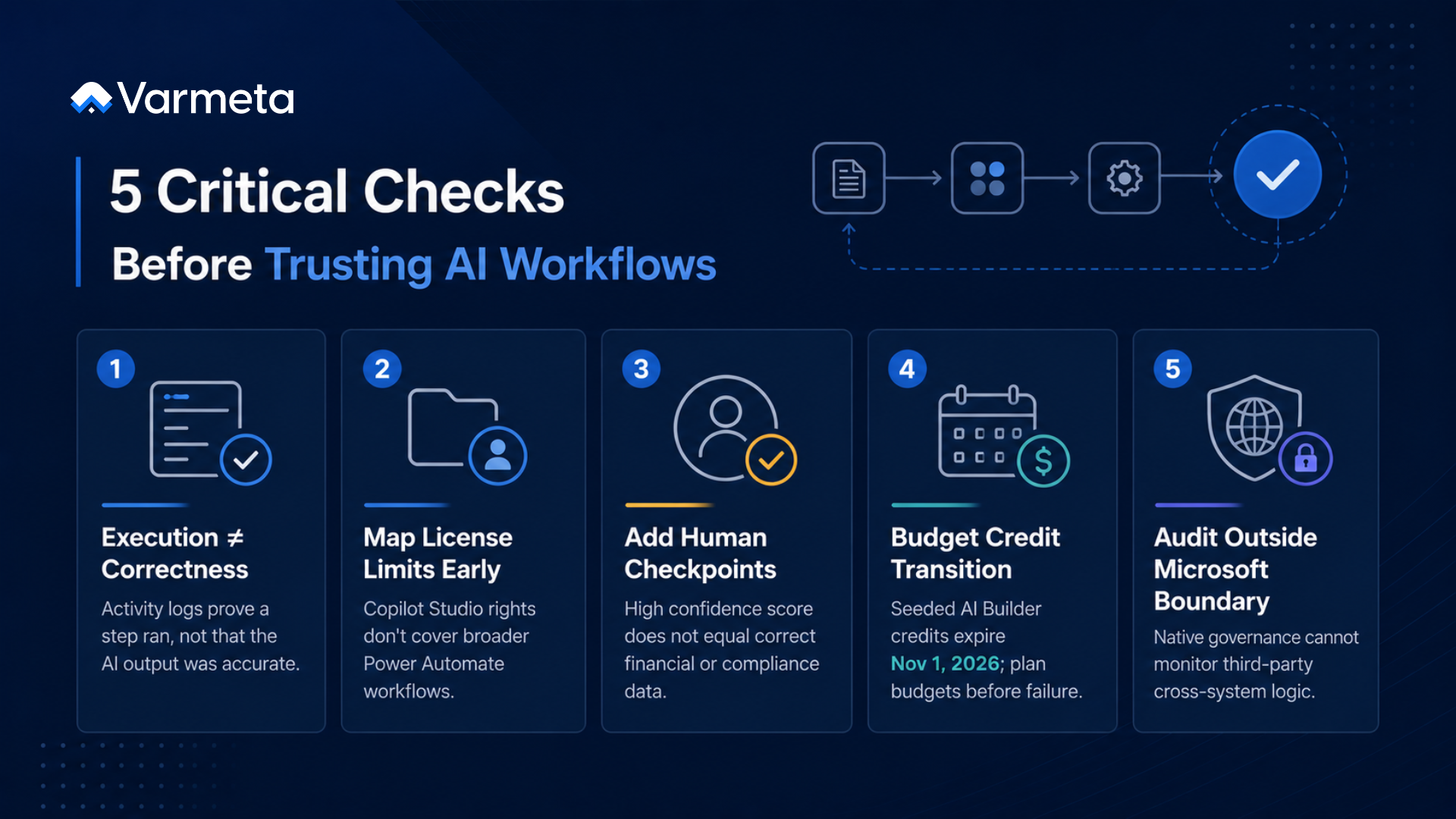
- Treat flow run history and Copilot Studio analytics as activity records, not correctness records. They confirm a step executed and stayed inside its permitted scope, which is necessary but not sufficient once that step is making a judgment call.
- Map exactly what a given license actually includes before scoping an AI workflow around it. Power Automate use rights inside Copilot Studio are scoped to that bot’s context specifically, and assuming broader coverage is a common way projects run into unplanned licensing gaps mid-build.
- Put a human checkpoint in front of any AI-driven step where a wrong output is costly to reverse. Financial data extraction, customer-facing routing decisions, and anything touching compliance records are the clearest cases where a high confidence score isn’t the same as a correct one.
- Plan the AI Builder credit transition now, not in October. Seeded credits disappear on November 1, 2026, and any flow still depending on them needs a Copilot Credit budget in place before that date, not after flows start failing.
- Build a separate verification plan for anything a workflow needs to do outside Microsoft’s connector boundary. Power Automate’s governance tools only see what happens inside systems it natively integrates with, so cross-system AI logic needs its own audit layer rather than an assumption that the Power Platform admin center already covers it.
Conclusion
None of this means Microsoft workflow tools like Power Automate and Copilot are the wrong choice. They remain the fastest way to move data and draft content inside a Microsoft 365 environment, and Microsoft is visibly investing in the governance layer around them. What hasn’t caught up yet is the specific question this article has been building toward: proving that an AI-driven decision inside a workflow was correct, not just that the workflow ran it. Audit tooling built for deterministic automation wasn’t designed to grade an AI’s judgment, and that gap shows up in every workflow platform adding AI decision-making right now, not just Microsoft’s.
If you’re still evaluating which platform to build on in the first place, our workflow tools comparison guide covers the same execution-verification criterion across seven other tools. It’s also the exact problem Varmeta’s AI work is built around, closing the distance between a workflow that ran and a decision you can actually stand behind.
FAQs
1. Does Power Automate still include free AI Builder capacity in 2026?
This is one of the most common licensing questions IT teams researching Microsoft workflow tools ask right now. Seeded AI Builder credits bundled into licenses like Power Automate Premium remain usable through November 1, 2026, after which Microsoft removes them entirely. New customers have not been able to purchase AI Builder capacity add-ons since November 1, 2025, and now run AI Builder features on Copilot Credits instead.
2. What’s the difference between Copilot Studio and Power Automate for building AI-driven workflows?
Copilot Studio is built for agents that interpret requests and choose their own actions, and those agents can call Power Automate cloud flows as part of that process. Power Automate’s use rights inside Copilot Studio are scoped specifically to that bot’s context, so teams building standalone automations beyond a single agent typically need separate Power Automate licensing.
3. Can Microsoft’s native tools produce an audit trail for what an AI step decided?
They can show that a flow or agent ran, what path it took, and in many cases what output it produced. They don’t independently verify that the output itself, an extracted value, a routing decision, a drafted response, was correct, which is a different claim than confirming the step executed.
4. When does the AI Builder licensing shift actually affect a workflow?
Any flow that draws on seeded AI Builder credits from a Power Automate Premium, Power Apps Premium, or qualifying Dynamics 365 license stops being able to use those credits after November 1, 2026. Flows that exhaust their credits without a Copilot Credit budget in place will fail rather than complete.
5. Is it worth moving off Microsoft workflow tools to solve the verification gap?
Not for structured, in-boundary automation, where Power Automate and Copilot remain efficient. The gap shows up specifically around AI-driven decisions and cross-system actions, which is a reason to add a verification layer around those specific steps rather than replace the platform they run on.