Salesforce remains the CRM leader. However, high costs and steep learning curves push businesses toward better Salesforce competitors in 2026.
While Salesforce dominates, rivals like HubSpot and Zoho are gaining ground quickly. Many SMBs now prefer simpler interfaces and lower ownership costs. Companies often switch to avoid heavy admin overhead and long implementation times. Specialized tools provide better agility for modern teams.
Varmeta ranked these alternatives based on Gartner insights, user reviews, and pricing transparency. Our evaluation focuses on feature depth and overall value.
Explore our top 10 list to find the perfect CRM fit for your growth.
Quick Comparison Table – Top Salesforce Competitors at a Glance
| Rank / Tool | Best For | Starting Price (2026) | Key Strength | Ideal Company Size |
| 1. Microsoft Dynamics 365 | Enterprise Integration | ~$65 /user/mo | Native Microsoft 365 & Azure synergy | 500+ Employees |
| 2. HubSpot CRM | All-in-One Scaling | $15 /user/mo | Exceptional UX & Marketing alignment | 20–500 Employees |
| 3. Zoho CRM | High Value / Budget | $14 /user/mo | Massive feature-set for the price | 10–500 Employees |
| 4. Pipedrive | Sales Simplicity | $14 /user/mo | Visual pipeline & rep adoption | 1–50 Employees |
| 5. Freshsales | AI-Powered Selling | $15 /user/mo | Built-in phone, email & Freddy AI | 5–100 Employees |
| 6. monday CRM | Sales-to-Project Flow | $12 /user/mo | Bridge between Sales & Operations | 5–200 Employees |
| 7. Oracle NetSuite | ERP + CRM Hybrid | ~$999 /mo (Base) | Single source of truth (Sales + Finance) | 100+ Employees |
| 8. Salesflare | Zero-Touch Automation | ~$29 /user/mo | Automated B2B data logging | 1–50 Employees |
| 9. Creatio | No-Code Customization | $25 /user/mo | Superior BPM & workflow agility | 50+ Employees |
> Read more: AI in CRM: From System of Record to Intelligent Customer operating System
Top 10 Salesforce Competitors and Alternatives (2026 Comparison)
1. Microsoft Dynamics 365 – Best Enterprise Salesforce Alternative

Microsoft Dynamics 365 stands as the most formidable of all Salesforce competitors for large-scale enterprises. It is a unified ecosystem that merges sales, service, and ERP operations into one intelligent platform.
Key Features
- AI Copilot: A native generative AI that drafts emails, summarizes Teams meetings, and provides real-time insights directly within your workflow.
- Deep Microsoft 365 Integration: Syncs seamlessly with Outlook and Teams. You can update CRM records directly from your email inbox or collaborate on deals via Teams channels.
- ERP + CRM Synergy: Beyond sales, it handles finance and operations. Use Power BI for advanced analytics and Power Automate to build complex, no-code workflows.
Pricing
- Sales Professional: Starts at $65/user/month.
- Sales Enterprise: Typically ranges from $115 to $210/user/month.
- Implementation Note: Mid-market setups often start at $50,000, while global enterprise deployments can exceed $1M.
| Pros | Cons |
| Native Synergy: Flawless integration with Excel, Outlook, and SharePoint. | High Complexity: Requires specialized IT teams for setup and maintenance. |
| Advanced AI: Copilot offers superior out-of-the-box automation. | Learning Curve: Steep training requirement for non-Microsoft users. |
| Security: Enterprise-grade compliance (HIPAA, GDPR, FedRAMP). | Hidden Costs: Extra fees for storage and premium integration connectors. |
Dynamics 365 is the premier choice for large organizations (100–5,000+ employees) already invested in the Microsoft infrastructure. It is particularly effective for sectors like manufacturing, healthcare, and finance where security and unified data are non-negotiable.
2. HubSpot CRM – Best Free / Marketing-First Alternative

As one of the most popular Salesforce competitors, HubSpot CRM is the gold standard for businesses prioritizing ease of use and marketing-sales alignment. Created by the pioneers of inbound marketing, it offers a seamless experience that avoids the “franken-system” feel of legacy CRMs.
Key Features
-
- All-in-One Platform: A unified database connecting Marketing, Sales, Service, Content, and Operations Hubs.
- Breeze AI: An integrated AI copilot that drafts emails, scores leads, and provides conversation intelligence—built directly into the workflow.
- Inbound Powerhouse: Top-tier tools for email marketing (up to 2,000 free monthly emails), landing pages, and live chat.
Pricing
- Free Plan: Robust features for unlimited users.
- Starter: Starts at $15/user/month (includes Breeze AI).
- CRM Suite Starter: Begins at $50/month for a bundle of marketing and sales seats.
- Note: Costs scale steeply when moving to Professional or Enterprise tiers as your contact list grows.
Pros & Cons
| Pros | Cons |
| Lower TCO: Often 30-40% cheaper than enterprise competitors over time. | Scaling Costs: Prices jump significantly once you outgrow the “Starter” plans. |
| Fast ROI: Typical implementation takes only 4–8 weeks. | Simpler Automation: Lacks the advanced autonomous “agents” found in Salesforce. |
| Included AI: Breeze AI is available across all tiers without extra licenses. | Marketplace: Smaller third-party app ecosystem compared to Salesforce. |
HubSpot is the ideal choice for startups and mid-market companies (50–500 employees) that need to move fast. It is perfect for SaaS, e-commerce, and professional services where marketing and sales must stay perfectly in sync without the burden of heavy IT overhead.
3. Zoho CRM – Best Affordable All-in-One Alternative
Among Salesforce competitors, Zoho CRM stands out as the champion of “more features per dollar.” It offers a sophisticated, data-driven platform that handles complex sales cycles without the enterprise price tag or the overwhelming learning curve.
Key Features
- Extensive Automation: Use Zoho Flow’s drag-and-drop designer to automate lead collection, record updates, and external app triggers.
- Zia AI Assistant: A built-in digital assistant that predicts deal closure probability, suggests the best time to contact leads, and detects anomalies in your sales data.
- Omnichannel Communication: Manage customer interactions across email (Gmail, Outlook), phone (Zoho PhoneBridge), and social media (WhatsApp, Facebook) within a single timeline.
- Rich Integration Ecosystem: While Zoho offers 50+ native apps, its marketplace features 2,500+ plugins for tools like Shopify, Slack, and GoToMeeting.
Pricing
- Free Plan: Supports up to 3 users with basic lead management.
- Standard: $14/user/month (billed annually).
- Professional: $23/user/month (billed annually).
- Enterprise: $40/user/month (billed annually).
- Ultimate: $52/user/month (billed annually).
Pros & Cons
| Pros | Cons |
| Unbeatable Value: Full-featured enterprise tools for under $60/month. | Interface Polish: The UI can feel cluttered and less modern than HubSpot. |
| Omnichannel Tracking: Seamless history across phone, chat, and email. | Learning Curve: More complex to set up than “entry-level” CRMs. |
| Data Integrity: Built-in tools for duplicate management and anomaly detection. | App Depth: While large, the ecosystem is not as deep as Salesforce’s AppExchange. |
Zoho CRM is the best fit for budget-conscious SMBs that want to scale. It is ideal for teams in retail, real estate, and professional services that require robust workflow automation and cross-channel communication without the “Salesforce Tax.”
4. Pipedrive – Best Simple Sales Pipeline Alternative
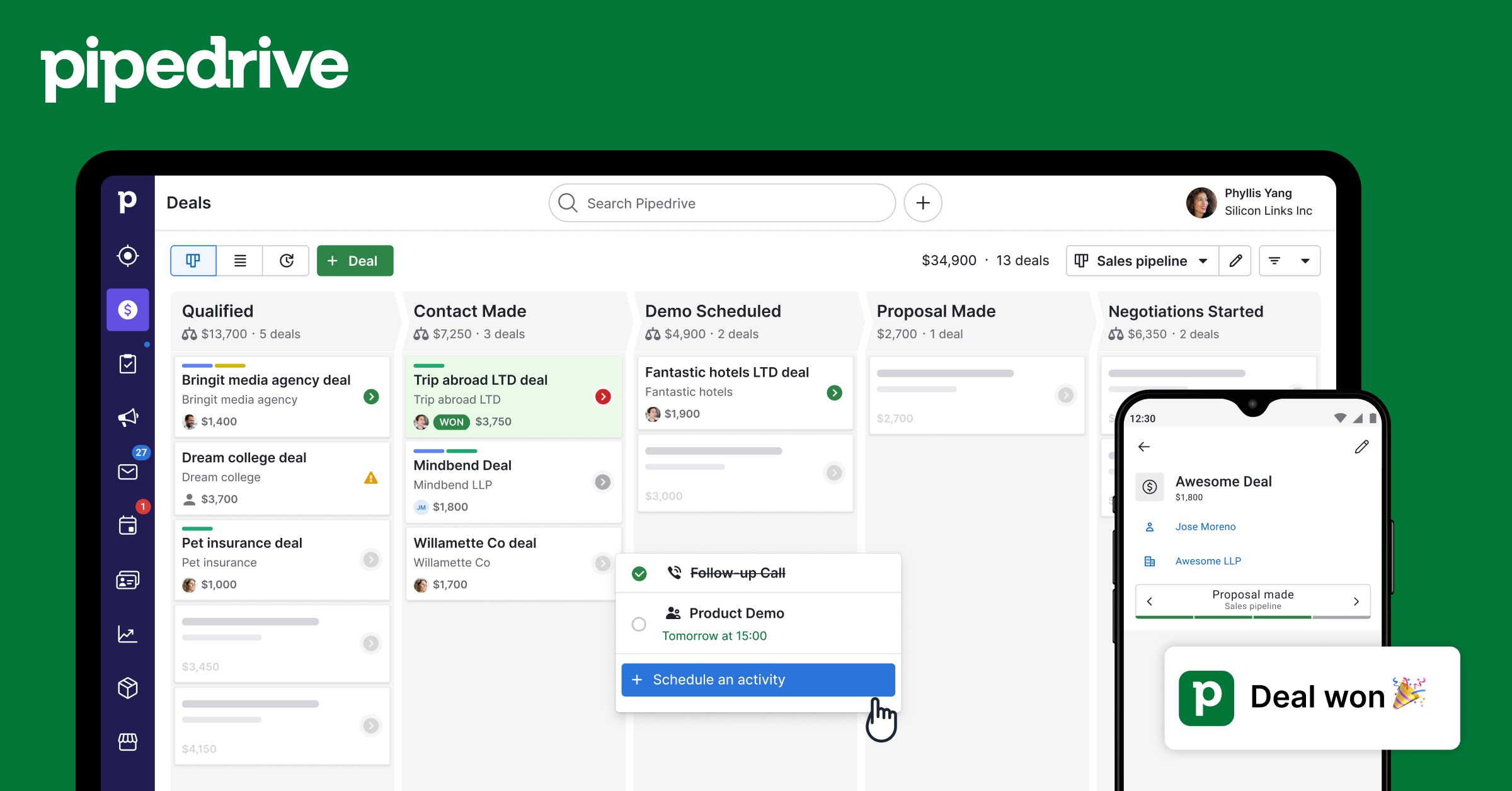
Pipedrive is a sales-first CRM that prioritizes activity-based selling. Instead of trying to be an all-in-one marketing and service suite, it excels at visual pipeline management. It is designed for speed, momentum, and high adoption rates among field and inside sales teams.
Key Features
- Visual Pipeline Management: A clean, Kanban-style drag-and-drop interface that gives reps an instant view of their entire sales funnel and deal health.
- Activity-Centric Tracking: The system prompts users to schedule the next action (call, email, or meeting) for every deal, ensuring no prospect ever “goes cold.”
- Powerful Mobile App: Optimized for on-the-go selling with offline access, voice note recording, and an AI-powered route planner for field reps.
- Sales Assistant: An AI-powered mentor that analyzes your past performance to suggest tips and automation that can speed up your sales cycle.
Pricing
- Essential: Starts at $14/user/month (billed annually).
- Advanced: $29/user/month (includes basic automations).
- Professional: $49/user/month (adds revenue forecasting).
- Power/Enterprise: Ranges from $64 to $99/user/month for large-scale teams.
Note: Pipedrive does not offer a free tier, but provides a 14-day free trial.
Pros & Cons
| Pros | Cons |
| User Adoption: So intuitive that teams can be fully operational in just a few days. | Limited Scope: Lacks built-in marketing and customer support modules. |
| Focus: Zero “feature creep”; every tool is built to help reps sell faster. | Add-on Costs: Lead generation tools (like chatbots) require extra monthly fees. |
| Integration: Seamlessly connects with 400+ apps and Zapier. | Advanced Scaling: Gaps in complex “agentic” AI compared to high-end rivals. |
Pipedrive is the perfect choice for small to midsize sales teams (under 50 reps) that need a lightweight, effective tool. It is particularly popular in real estate, professional services, and high-volume sales environments where rep productivity is the top priority.
> Read more: 10+ AI Tools For Sale Teams To Boost Revenue In 2026
5. Freshworks (Freshsales) – Best AI-Powered SMB Alternative
Freshworks (Freshsales) is a leading choice among Salesforce competitors for teams that want a “plug-and-play” experience. It excels by embedding everything, calls, emails, chat, and AI, into a single, high-polish workspace designed specifically for small and mid-sized businesses.
Freshsales removes the need for expensive third-party communication tools. It positions itself as an intelligent “Sales Command Center” where AI doesn’t just store data but actively helps you sell. It is particularly valued for its fast setup, often taking just 1 to 3 days to go live.
Key Features
- Freddy AI: A built-in assistant that provides predictive lead scoring, flags “rotting” deals, and drafts personalized sales emails.
- Unified Communications: Includes native cloud telephony (virtual numbers in 90+ countries), two-way email sync, and live chat—all built-in.
- Modern Interface: A clean, Kanban-style layout that minimizes the clicks needed to move a deal forward.
- AI Forecasting: Provides data-backed insights into future revenue, helping managers make more accurate decisions.
Pricing
- Free Plan: Supports up to 3 users with basic contact management and a built-in phone dialer.
- Growth: $15/user/month (billed annually), best for basic pipeline tracking.
- Pro: $39/user/month (billed annually), the “sweet spot” that unlocks Freddy AI and multiple pipelines.
- Enterprise: $69/user/month (billed annually), adds advanced AI forecasting and audit logs.
Pros & Cons
| Pros | Cons |
| All-in-One Voice: Built-in phone and SMS mean you don’t need a separate VOIP system. | Feature Gating: Many critical tools like AI scoring are locked behind the $39 Pro tier. |
| Simplicity: One of the easiest learning curves in the CRM market. | Marketing Gap: Advanced marketing tools require a separate “Freshsales Suite” upgrade. |
| Support: Offers 24×5 phone support even for users on the Free plan. | Marketplace: Smaller app ecosystem (approx. 1,000 apps) compared to Salesforce. |
Freshsales is the premier choice for growing teams (5–30 users) moving off spreadsheets. It’s perfect for outbound-heavy industries like recruitment, insurance, or SaaS startups that need a unified phone and email system without the “Salesforce Tax.”
6. Zendesk Sell – Excellent for customer service + sales integration

Zendesk Sell is a unique contender among Salesforce competitors, specifically designed to bridge the gap between sales and support. By unifying these two departments, it ensures that your team delivers a consistent, high-quality experience throughout the entire customer lifecycle.
Zendesk Sell thrives on its deep connection to the Zendesk Support suite. It provides a 360-degree view of the customer, allowing support agents to pass leads to sales with a single click, and giving sales reps full visibility into a prospect’s support history before they ever pick up the phone.
Key Features
- Deep Support Integration: Support agents can use a “Notify Sales” button, while sales reps can view active support tickets directly on a prospect’s contact card.
- Automatic Activity Logging: Automatically captures every email and call, providing real-time visibility into communication history for both departments.
- Automated Task Triggers: Admins can set up triggers that automatically generate follow-up tasks the moment a new lead or deal is created.
- Robust Mobile App: A top-tier mobile experience that allows field reps to log activities and update pipelines instantly without a desktop.
Pricing
- Sell Team: Starts at $19/user/month (billed annually).
- Sell Growth: $55/user/month, adds sales forecasting and more pipelines.
- Professional: $115/user/month, unlocks task automation and lead scoring.
- Enterprise: $169/user/month, for high-volume teams requiring advanced insights.
- Important Note: Zendesk has announced that Zendesk Sell will be retired on August 31, 2027, so plan your long-term roadmap accordingly.
Pros & Cons
| Pros | Cons |
| Departmental Harmony: Best-in-class alignment between sales and service. | Retirement Notice: The product will be officially discontinued in late 2027. |
| Interface Design: Sleek, modern UI that reduces user onboarding time. | Feature Gating: Automation and lead scoring are locked behind the $115+ tiers. |
| Mobile Selling: Highly intuitive app for field-based sales teams. | Limited Customization: Not ideal for businesses with highly complex or non-standard workflows. |
Zendesk Sell is the premier choice for service-heavy organizations already using the Zendesk ecosystem. It is perfect for companies where cross-departmental collaboration is the key to growth and for mobile-heavy teams that need real-time data access.
7. monday.com Sales CRM – Best for Sales & Project Workflow Integration

Among Salesforce competitors, monday.com Sales CRM stands out by blurring the line between “closing a deal” and “executing a project.” Built on a flexible Work OS, it is the top choice for teams that need their CRM to talk directly to their operations and project management boards.
The biggest differentiator for monday.com is its all-in-one workflow connectivity. Unlike traditional CRMs that act as isolated silos, monday.com allows a seamless transition from Sales to Delivery. It positions itself as an intuitive, visual platform where anyone—even those who aren’t “tech-savvy”—can manage complex customer journeys without a consultant.
Key Features
- Visual Sales Pipeline: A highly customizable, drag-and-drop Kanban interface with color-coded statuses for instant funnel visibility.
- No-Code Automation: Use simple “If-Then” recipes to automate follow-up emails, move deals between stages, or assign tasks to team members.
- Sales-to-Delivery Sync: Automatically triggers the creation of a project board once a deal is marked “Closed-Won,” carrying over all client history and budgets.
- 360-Degree Contact View: A unified timeline that captures every Gmail/Outlook sync, meeting note, and call log in one central location.
Pricing
- Basic: $12/user/month (billed annually).
- Standard: $17/user/month (The most popular tier for growing teams).
- Pro: $28/user/month (Unlocks advanced automations and formulas).
- Enterprise: Custom pricing for large-scale governance and security.
- Note: Requires a minimum of 3 users, meaning starting costs are at least $36/month. There is no free tier.
Pros & Cons
| Pros | Cons |
| Extreme Ease of Use: One of the most intuitive interfaces on the market. | Automation Limits: Lower tiers have strict monthly action caps (e.g., 250/month). |
| Unified Workflow: Connects Sales, Marketing, and Operations in one tool. | No Solo Plan: The 3-user minimum makes it pricey for individual users. |
| Fast Setup: Pre-built templates allow you to go live in minutes, not weeks. | Enterprise Gating: Lead scoring is locked behind the highest Enterprise tier. |
monday.com is perfect for project-based businesses (Agencies, Consulting, Software Dev) and SMBs that want to manage their entire company in one place. It’s the ideal solution for teams that value visual organization and need to bridge the gap between their sales reps and project managers.
8. Oracle NetSuite / SAP CRM – Best Unified Cloud ERP + CRM for Rapidly Scaling Enterprises
For companies that have outgrown QuickBooks or disconnected systems, Oracle NetSuite is a premier Salesforce competitor. It is a “cloud-native” powerhouse that combines ERP, CRM, and Financials into a single, unified database.
NetSuite’s strength lies in unification. While Salesforce requires integration with accounting software, NetSuite handles everything, from lead generation to revenue recognition, under one roof. It is the logical choice for mid-to-large enterprises that want to eliminate “data silos” and manage global operations from a single platform.
Key Features
- Unified ERP & CRM: Shares a single data model, providing a 360-degree view of customers, orders, and financial health.
- NetSuite OneWorld: Manages multiple subsidiaries, currencies, and global tax compliance in real-time.
- Advanced Revenue Management: Built-in tools for complex revenue recognition (ASC 606 / IFRS 15), perfect for SaaS and subscription models.
- SuiteCloud Customization: Allows deep workflow tailoring that stays intact even during NetSuite’s twice-yearly automatic updates.
Pricing
- Base Fee: Starts around $999/month.
- User Fee: Approximately $99 – $199/user/month.
- Implementation: Typically ranges from $80,000 to $200,000 for mid-sized deployments.
Pros & Cons
| Pros | Cons |
| True Cloud: No hardware maintenance or costly version upgrades. | High Entry Cost: Licensing fees add up quickly as you add modules. |
| Data Integrity: Finance and CRM are natively linked without middleware. | Manufacturing Depth: Lacks some hyper-specialized shop floor tools vs. SAP. |
| Scalability: Built to support growth from $10M to $500M+ in revenue. | Complexity: Requires a professional implementation team. |
NetSuite is ideal for fast-growing mid-market companies ($10M–$500M revenue), SaaS startups, and professional services firms. It’s perfect for organizations that need a “single source of truth” for both their sales pipeline and their balance sheet.
Real-World Insight: “Many companies switch to NetSuite when their growth breaks their current systems. KURU Footwear, for example, moved from QuickBooks to NetSuite to sustain their rapid expansion. As CFO Craig Rasmussen noted: ‘Our growth was so massive we had to find a system that could maintain that momentum for years to come.'”
9. Salesflare – Best for “Zero-Touch” Automation & B2B Sales
If your team views data entry as a chore that kills productivity, Salesflare is the standout choice among Salesforce competitors. It is designed specifically to be a “zero-touch” CRM, working silently in the background so sales reps never have to manually log a meeting or hunt for a phone number again.
Key Features
- Automated Data Enrichment: It scans email signatures, LinkedIn profiles, and company websites to automatically populate contact details and social profiles.
- Automatic Interaction Tracking: Every email sent, meeting scheduled, and call made is automatically logged to the correct account timeline by syncing with your existing calendar and inbox.
- Clean Insights Dashboard: Offers a high-level, visual summary of pipeline health and team engagement metrics without the need for complex custom report building.
- Document Folder Integration: Automatically organizes files exchanged in emails into dedicated account folders, making it easy to find contracts or proposals.
Pricing
- Growth: Starting around $29/user/month (billed annually)
- Pro: Approximately $49/user/month, adds email sequences and custom permissions.
- Enterprise: Around $99/user/month, includes dedicated support and custom training.
- Note: Salesflare remains one of the most budget-friendly options for B2B teams seeking high-end automation.
Pros & Cons
| Pros | Cons |
| Massive Time Savings: Eliminates nearly all manual data entry and logging. | B2B Specific: Its logic is heavily tailored for B2B; less effective for B2C models. |
| Ease of Use: Extremely user-friendly interface with almost zero setup time. | Limited Extras: Lacks advanced inventory or complex CPQ (quoting) tools. |
| Flawless Sync: The background integration with Google and Outlook is exceptionally stable. | Reporting Depth: Custom reporting is functional but lacks the granular depth of Salesforce. |
Salesflare is the perfect fit for B2B sales teams and agencies that want a CRM that “just works.” It is ideal for small teams that don’t have a dedicated CRM admin and want their reps focused on talking to customers rather than filling out digital forms.
10. Creatio – Best No-Code & Workflow Automation Alternative

Rounding out our list of top Salesforce competitors, Creatio is a powerhouse for organizations that refuse to be boxed in by rigid software. It stands out by merging a high-end CRM with a sophisticated Business Process Management (BPM) engine, all powered by a “no-code” philosophy.
Creatio is built for enterprises that need to automate complex, non-standard workflows at lightning speed. Its “Freedom UI” allows “citizen developers”, business users without coding skills, to build and modify apps using simple drag-and-drop tools.
Key Features
- No-Code Platform (Creatio Studio): A visual design environment where you can build custom interfaces, workflows, and business logic in hours rather than weeks.
- Unified CRM Ecosystem: Seamlessly syncs Sales, Marketing, and Service modules on a single data platform for a complete 360-degree customer view.
- AI Agents & Copilot: Native AI that handles lead scoring, recommends next-best actions, and even helps users build new processes using natural language commands.
- Advanced BPM Engine: Sophisticated tools for modeling complex business processes, including automated routing, approvals, and multi-stage sequences.
Pricing
Creatio uses a modular “Platform + Product” pricing structure (billed annually):
- Platform Tiers: Growth ($25/user/month), Enterprise ($55/user/month), or Unlimited ($85/user/month).
- CRM Modules: Add Sales, Marketing, or Service modules for an additional $15/user/month each.
- Note: There is a minimum requirement of 5 users for most plans.
Pros & Cons
| Pros | Cons |
| No-Code Power: Business teams can update workflows without waiting for IT. | Pricing Complexity: The “Base + Module” model can be confusing to calculate. |
| Deep Customization: Highly adaptable to unique or niche industry requirements. | Setup Effort: Requires more initial strategic planning than “plug-and-play” CRMs. |
| Integrated AI: Advanced Copilot features help with both selling and app building. | Learning Curve: While no-code, the sheer depth of features can be overwhelming. |
Creatio is ideal for mid-to-large organizations that have complex, inter-departmental processes. It is a favorite for industries like banking, manufacturing, and logistics where workflows are intricate and the ability to pivot quickly without a large team of developers is a massive competitive advantage.
How to Choose the Right Salesforce Alternative in 2026
Migrating away from Salesforce is a major operational shift. In 2026, many businesses are moving toward alternatives to escape “complexity fatigue” and high overhead. Use this three-part framework to find your ideal fit.
1. Key Decision Factors
- Scale: Startups (<50 reps) should choose Pipedrive or Freshsales for speed. Mid-market firms (50–500) find the best power-simplicity balance in HubSpot or Zoho.
- Total Cost of Ownership (TCO): Salesforce licenses are only ~40% of the true cost. HubSpot provides 90% of the power for less, while Zoho leads in affordability ($14/user).
- Stack: Microsoft users should pick Dynamics 365; Google users, Copper. For project-heavy sales, monday CRM is the top 2026 hybrid.
2. Strategic Migration Tips
- Clean Data: Scrub duplicates before importing. Use AI tools like Freshsales’ importer to map Salesforce data with 90%+ accuracy.
- Rep Buy-in: 40% of migrations fail due to poor adoption. Show reps how AI automation saves them time rather than just tracking their work.
- Watch Hidden Costs: Calculate a 5-year TCO. Watch for API limits, storage fees, and support surcharges that inflate the base seat price.
3. When to Stick with Salesforce
- High Complexity: For massive corporations needing unique logic via Apex code, Salesforce is still the gold standard.
- Ecosystem: If you rely on niche third-party tools, Salesforce’s 8,000+ AppExchange integrations are unmatched.
- Advanced AI: Salesforce Agentforce offers autonomous “Agentic AI” for cross-cloud workflows that standard assistants cannot yet handle.
Ready to Scale? Choose Your Perfect Salesforce Alternative Today
The best Salesforce competitor for your organization depends entirely on your specific growth goals, budget, and current tech stack. To ensure a smooth transition and high team adoption, we recommend selecting 2–3 options from this list and starting a free trial to test their workflows against your real-world sales cycles.
Before you move, audit your data. A clean migration is the secret to a successful CRM rollout. Focus on tools that offer native migration assistants to minimize downtime and preserve your valuable customer history.
At Varmeta, we specialize in implementing advanced AI in CRM solutions that transform these alternatives into growth engines. Let our experts help you migrate seamlessly and unlock the full potential of a CRM tailored to your 2026 business goals.
Frequently Asked Questions
What are the top Salesforce competitors in 2026?
In 2026, the market is led by Microsoft Dynamics 365 for enterprises, HubSpot for scaling SMBs, and Zoho CRM for high-value features at a lower cost. Other specialized alternatives include Pipedrive for sales-first teams, monday.com for project-integrated workflows, and Oracle NetSuite for companies requiring a unified ERP and CRM.
Is HubSpot a good alternative to Salesforce?
Yes, HubSpot is widely considered the best alternative for organizations prioritizing ease of use and marketing-sales alignment. While Salesforce offers deeper customization for complex global enterprises, HubSpot provides roughly 80-90% of the same functionality with a much lower learning curve and a faster implementation time (typically 4–8 weeks).
How much cheaper are Salesforce alternatives?
Salesforce alternatives can reduce your Total Cost of Ownership (TCO) by 30% to 60%. While Salesforce licensing is expensive, the hidden costs of consultants and specialized admins often double the price.
Which Salesforce alternative is best for small businesses?
For very small teams or startups, Pipedrive is the top choice due to its simple, visual “zero-distraction” pipeline. If you need a free tier to start, HubSpot and Zoho CRM offer the most robust free versions that allow small businesses to manage contacts and basic deals without any upfront investment.